

Agile tickets are good
Controllable programs are better
Multi-project capability
Unlimited projects
Financial management
natively integrated
Audit trail & validation
at data level












Jira - strong for tickets, limited in control
Jira is one of the most widely used systems for task and issue tracking. It effectively supports backlogs, sprints and agile working methods, especially in software and IT teams. Jira is therefore often the tool of choice for operational, ticket-based work.
However, Jira is not designed for program and portfolio management. The platform does not offer native support for structured project portfolios, hierarchical programs or dependencies across many projects. As soon as organizations need to coordinate multiple projects in parallel, track strategic KPIs or meet funding and governance requirements, Jira boards quickly reach their structural limits.
Financial control, milestone logic or claims are not part of the core system. Monitoring & evaluation and reporting remain at a basic level and require additional apps, manual evaluations or individual configurations. Data is distributed across projects, boards and extensions - with limited control, validation and traceability.
The limitation is also clear in the governance context: Jira focuses on tasks, not control. Public guidelines, assurance structures, audit trails or logical funding decision-making processes can only be mapped indirectly or outside the system.


What does myPARM offer as an alternative to Jira?
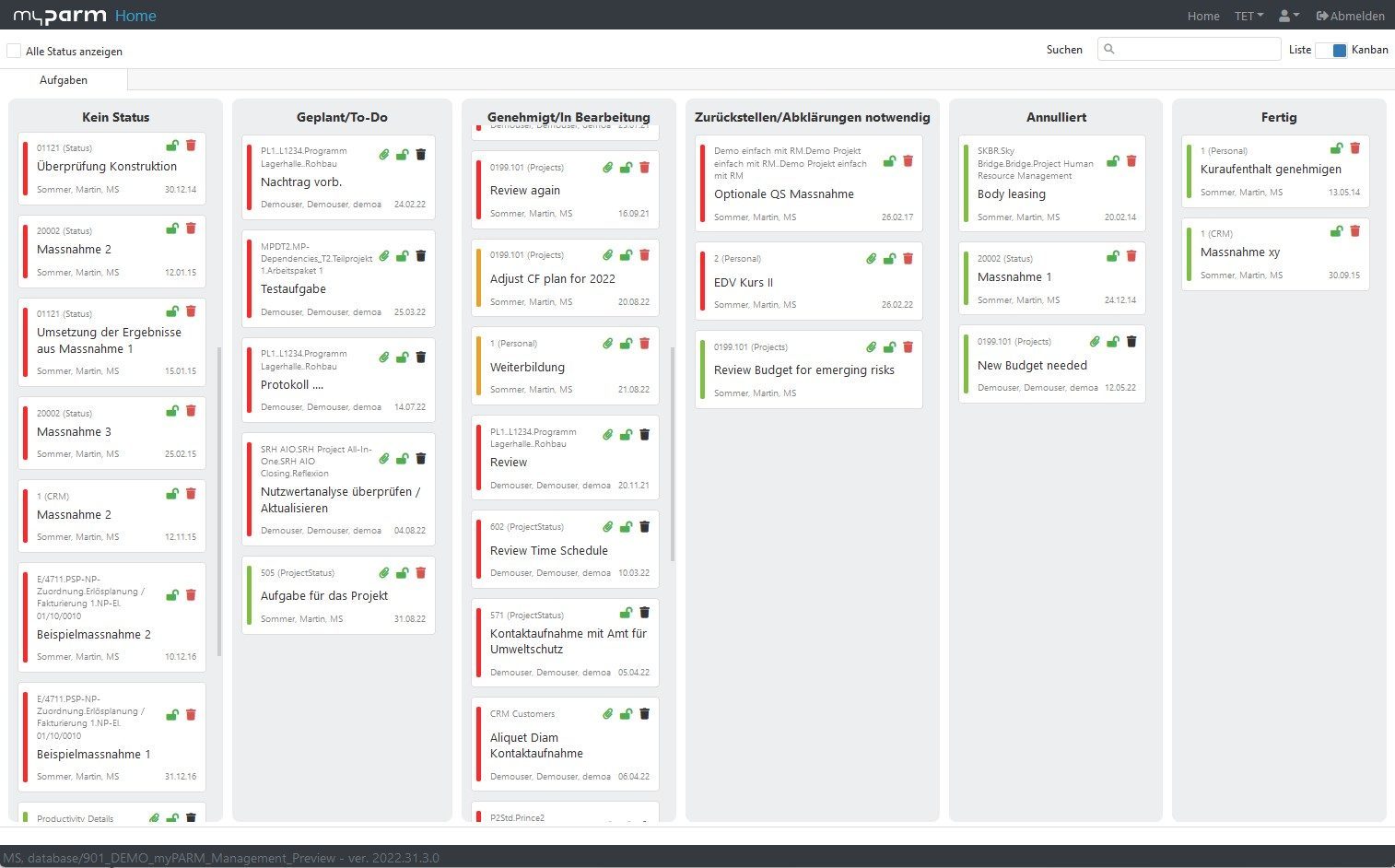
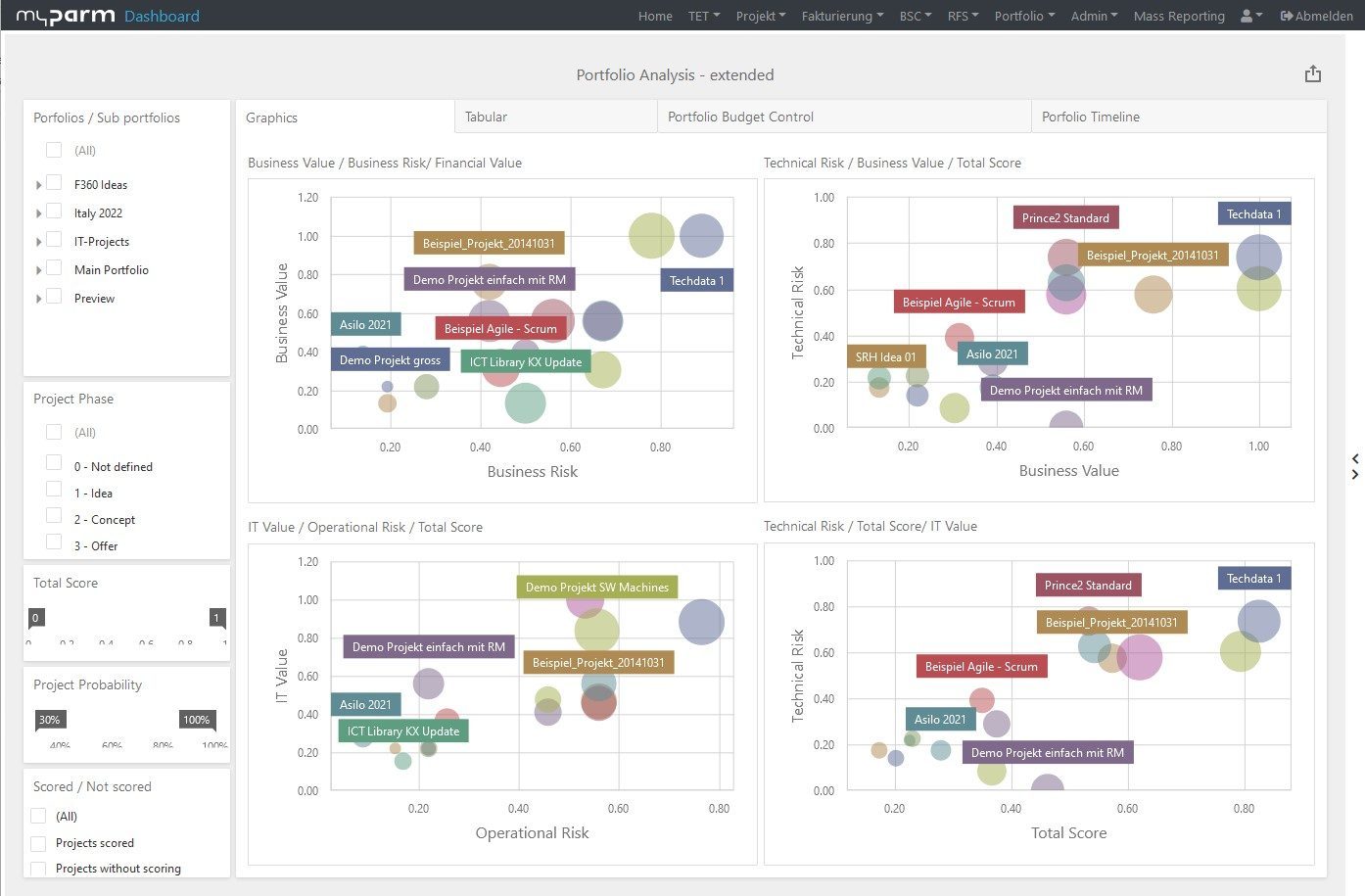
While Jira supports operational ticket work, myPARM enables the structured management of complex project landscapes - even in regulated and high-volume environments.
Organizations that switch from Jira to myPARM win:
A multi-project and portfolio view for an unlimited number of projects
Fully integrated KPI, M&E and milestone logic
Reliable budgeting, forecasting and claims in one system
Workflow-based governance, approvals and escalations
Audit trails, validations and data consistency at system level
Anyone using Jira as a project management tool today can easily switch to myPARM: Data can be transferred in a structured way, workflows are mapped cleanly and complex portfolios immediately gain clarity and controllability.
myPARM extends Jira with comprehensive project portfolio management capabilities, including financial planning, budgeting, resource management, and portfolio governance. Using the available APIs, Jira can be integrated with myPARM, allowing companies to continue using Jira for ticketing and operational workflows while leveraging myPARM as a strategic PPM layer.
Would you like to take a look at the software?
Compare both options and decide for yourself
| Criteria | myPARM ProjectManagement | Jira (Atlassian) |
| Technology architecture | Modular, enterprise-grade 3-tier architecture with middleware, REST APIs, OpenAPI | Cloud-first architecture, REST API and Atlassian Connect framework |
| Project and program management | Extended support for over 800 parallel projects, KPIs at portfolio level, phase-based planning | Task and sprint-based project boards; no native portfolio control |
| Monitoring and evaluation | Real-time KPIs, early warning indicators, milestone tracking across projects | Simple dashboards and status filters; limited to problem-based metrics |
| Workflow automation | Rule-based workflows, automated escalation paths, task dependencies | Integrated Jira automation engine with triggers and conditions |
| Financial forecasts and receivables | Integrated controlling, budgeting, cost categories, invoice workflows (e.g. linked to SAP) | No financial modules; requires third-party integrations or Jira Work Management |
| User-friendliness and user interface | Structured user interface, role-based views, multilingual, configurable dashboards | Modern user interface, Kanban/Agile-centered, but limited hierarchy and structure |
| Report generation and dashboards | Integrated report generator and dashboard designer; exportable to PDF/Excel/Word | Dashboards with gadgets; exports via CSV or third-party tools |
| Data quality and governance | Centralized validated inputs, monitoring at interface level, support of audit trails | Limited audit trail; problem history only; no input validation |
| Scalability | Unlimited number of users, resources, projects and project portfolios, SaaS/on-premise/custom hosting | Scales well in the cloud, but additional apps are required for large-scale reporting |
| Security and compliance | LDAP, AD, Entra (Azure AD), SSO, HTTPS, VPN; strong control of data sovereignty | Atlassian Access for SSO/SAML; hosted in the Atlassian cloud |
Why myPARM ProjectManagement?

Developed for complex multi-project environments
myPARM offers clear structures, responsibilities and strategic orientation, not just task management.

Structured management, assurance & strategic alignment
KPIs, impact logics, milestones, dashboards and early warning indicators create transparency regarding progress, risks and target achievement.

Less risk through integrated workflows & controls
Approvals, status changes, escalations and milestone checks are systemically anchored and reduce operational and governance-related risks.

Flexibly adaptable to your individual needs
Whether funding cycles, outputs, KPIs or specific control models - myPARM adapts to existing frameworks without any programming knowledge.

Project & financial management in one system
Budget, forecast, cost and claims processes are natively integrated and can be connected via ERP interfaces without tool breaks.

Compliance, audit trails & manufacturer backing
Validated data, audit trails and audit trails meet regulatory requirements. Supplemented by SLAs, hosting options and experienced manufacturer support for long-term security.
FAQ
For which use cases is Jira particularly well-suited?
Jira is primarily used for task, issue, and ticket management. Software and IT teams, in particular, use the platform for agile methodologies such as Scrum or Kanban to efficiently organize backlogs, sprints, and work tasks. Jira offers a well-established and powerful solution for operational teamwork and the management of individual development processes.
When does Jira reach its limits in project management?
When companies need to coordinate multiple projects simultaneously, pursue strategic goals, or meet extensive governance requirements, traditional Jira boards are often no longer sufficient. Issues such as portfolio management, financial control, cross-project dependencies, or comprehensive management reporting often require additional tools, extensions, or customizations.
What are the main differences between Jira and myPARM?
Jira focuses primarily on the operational management of tasks, tickets, and agile workflows. myPARM extends this approach with features for multi-project management, portfolio management, resource management, financial planning, project controlling, and governance. This enables companies to centrally manage and monitor not only individual teams but entire project landscapes.
Can Jira be used for multi-project and portfolio management?
In principle, multiple projects can also be managed in Jira. However, as the number of projects increases, it becomes increasingly challenging to analyze resources, budgets, risks, and strategic metrics across projects. Specialized project portfolio management solutions offer centralized control and reporting functions that go beyond traditional ticket management.
What benefits does myPARM offer for project portfolios and programs?
myPARM provides a centralized view of projects, programs, and portfolios. Companies gain transparency into resources, finances, milestones, and key metrics on a single platform. This enables them to identify dependencies early on, better manage priorities, and make informed decisions based on up-to-date data.
Can Jira be used together with myPARM?
Yes, the two systems can complement each other effectively. Jira can continue to be used for day-to-day ticket management and agile teamwork, while myPARM handles the overarching management of projects, programs, and portfolios. Information can be exchanged via interfaces, allowing operational and strategic processes to be linked.
Why are companies looking for alternatives to Jira?
Many companies start using Jira because they need a powerful solution for agile work processes. However, as projects become more complex, additional requirements arise in areas such as financial management, resource planning, compliance, reporting, and portfolio management. In these cases, companies often seek solutions that provide not only operational capabilities but also strategic management functions within a single, centralized platform.